
Development
Review: Apple's hyper-pricey M5 Ultra Mac Studio made me into a vibe coder
September 24, 2026 Development Source: Ars Technica
Share this article



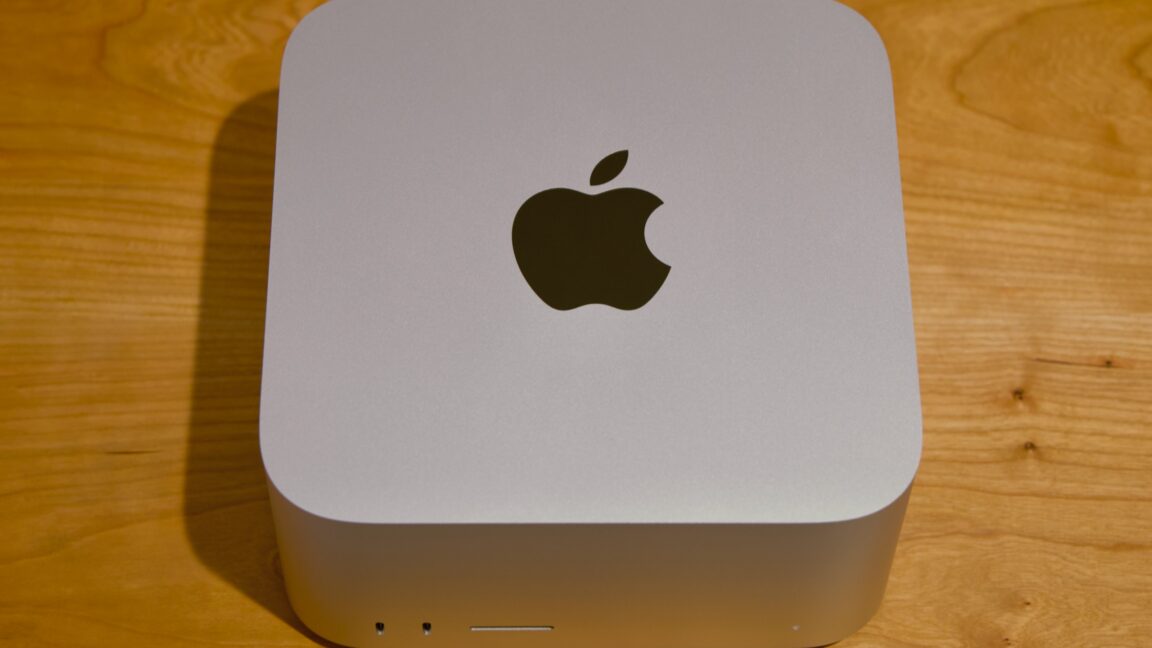
Both Studio models also come with nearly all the same ports. On the back, you’ll find four 120Gbps Thunderbolt 5 ports, a 10Gbps Ethernet port, an HDMI 2.1 port, and a pair of 5Gbps USB-A ports. On the front, both Studios have a UHS-II SD card reader, but the Max comes with two 10Gbps USB-C ports, and the Ultra comes with two more 120Gbps Thunderbolt 5 ports.
The Ultra’s additional oomph extends to external display support. The M5 Max supports up to five external displays, and the M5 Ultra supports up to eight, though both come with caveats depending on the resolution and refresh rates you’re using.
What’s different is that this generation’s M5 Pro and M5 Max are both already a pair of chiplets attached together via silicon interconnect, which means the M5 Ultra is actually four distinct bits of silicon packaged together. The potential downside for this arrangement is that die-to-die interconnects often can’t communicate quite as fast as components all housed on the same silicon. Overall, the Fusion Architecture hasn’t kept previous Ultra chips from being fast, and it doesn’t keep the M5 Ultra from being fast, either. But performance on the Ultra chips has never scaled perfectly linearly with the number of cores, and the M5 Ultra is the same way.
As for the Ultra? A 256GB RAM/1TB storage model that would have cost $5,599 18 months ago now costs $9,499—not quite twice the price but close enough to feel like it. There will be a 512GB version of the M5 Ultra Studio, but Apple hasn’t said what it will cost. The M3 Ultra version started at $9,499, so I feel pretty confident in saying that the M5 Ultra version will be a $20,000-and-up computer. To be interested in high-end local AI, you already have to be willing to pay more up front for hardware than you would to just use some company’s Nvidia-powered data center. At these prices, buying a cluster of Mac Studios feels like paying to build a data center out of your own pocket.
Bear that in mind as we talk about performance.
But we also observed some less-expected behavior. The Ultra’s Geekbench multicore performance is only around 26 percent faster than the Max, and in our CPU-based Handbrake video encoding test, the Max is actually faster to complete the H.264 encode (and barely slower at H.265).
Looking at the power consumption numbers offers a possible explanation. According to the powermetrics tool, both the M5 Max and M5 Ultra consume about 75 W of power on average during the video transcoding test. That’s also about the amount of power that the M3 Ultra Mac Studio used. But the Max Mac Studios have historically used less power than the Ultra chips. To me, this suggests that the M5 Ultra is being power-limited to keep it within the power/cooling envelope of the existing Studio design.
When you’re talking about running AI models locally, there are two hardware numbers that loom the largest. The first is the amount of GPU memory you have. The second is the amount of memory bandwidth you have, or how quickly that GPU can communicate with the rest of the system.
Your graphics RAM decides both the size of the models you can run—these need to be loaded pretty much entirely into GPU memory because anything after this will either spill over into your main system memory (slow) or, in a worst-case scenario, to your disk (even slower).
On top of this, particularly for coding, you need additional memory for “context,” or the amount of information an individual agent can recall before running out of memory. For a basic question-and-answer chatbot interaction, you don’t need a ton of context. For coding a full app, you’ll want to have a bunch of RAM available for context so the agent doesn’t get halfway through a complex task and “forget” what it was doing.
There are handoff mechanisms—one agent can condense a session to a single file that contains most of the relevant information from a session and pass it to another, effectively resetting the context. But things inevitably fall through the cracks with this mechanism, especially if there’s not all that much context to condense in the first place.
The memory bandwidth isn’t the only thing that determines how quickly the model will be able to spit out new words (“tokens”), but it’s probably the single most important thing. Even the speed and capabilities of the GPU that the RAM is attached to don’t matter that much, compared to the amount of memory you have and how quickly the computer can move data into and out of it.
Apple Silicon Macs have become popular for running these models because they’ve hit a sweet spot. They don’t provide as much memory bandwidth as a dedicated desktop GPU (a 5-year-old Nvidia GeForce RTX 3060 12GB offers 360GB/s of bandwidth, almost 20 percent more than the M5 Pro; an RTX 5070 12GB offers 672GB/s, more than M5 Max). But a 64GB Apple Silicon Mac offers more GPU memory than any single consumer GPU you can buy, its memory bandwidth is fast enough, and it’s dramatically more power-efficient than an RTX 5090 or a pair of RTX 3090s. And 96GB, 128GB, 256GB, and 512GB Apple Silicon Macs open the door to even larger, frontier-class models.
Obviously, those top-tier systems aren’t cheap right now, but this hopefully explains part of the reason it’s suddenly difficult to buy a Mac mini, of all things. And partly because the hardware is so well-suited to these workloads, Apple’s MLX framework has become reasonably well-optimized and supported by different language models and local AI-focused apps like LM Studio Bionic.
On top of these stats, you also have something called “time to first token” (TTFT)—the amount of time that passes between you handing a prompt to a model and the model processing it and responding. This is one place where the M5 generation improves on M4 and older: The neural accelerators Apple added to the GPU dramatically speed up the TTFT, making any locally run model feel more responsive.
Add this to the fact that the M5 Ultra dramatically boosts memory bandwidth compared to the M3 Ultra, and you get an idea of why this particular Mac Studio is well-suited to this kind of work. The fact that it’s a two-generation jump over last year’s M3 Ultra makes it look even better than the M5 Max Studio or the M5 Pro Mac mini.
First, I had the Qwen model write a Python script to convert bank statement PDFs into spreadsheets and format and sort them the way I wanted. I then built a web app around it so I could easily upload future sheets instead of messing with the LLM or the Python script.
I’m pretty conflicted about this, but there is an undeniable appeal to building a little piece of software to solve some intractable, specific-to-you problem in the space of a couple of afternoons. And in this case, you can do it on hardware in your own home, which your data never leaves, and it consumes less power than a single PC graphics card.
I probably could have solved this problem in an afternoon with a few dollars’ worth of tokens, but sending years of financial data to Anthropic or whoever is something I just couldn’t countenance. This way, I didn’t have to.
The Qwen 3.8 27B model is “open-weight” and has been released under an Apache 2.0 license, so there aren’t limits on its use. And it offers different “quantizations” (basically, trading a little precision for a smaller size) that help it span Macs with different amounts of RAM. I’d say 32GB is the smallest amount of RAM you could use to run the reasonably competent 4K quantization with enough context for very small projects or narrow fixes for existing projects, but 64GB is a better target for a system with a large window for context and enough memory to actually use the Mac as a regular computer at the same time.
Using the 4K quantization’s default settings in LM Studio Bionic running on macOS 27.0, my daily-driver M2 Mac Studio managed a token rate of roughly 18 to 20 per second on a sample prompt about spinning up a new website project. A Framework Desktop (which is based on the Strix Point Ryzen AI Max+ platform and is fairly popular among local AI enthusiasts because of its large pool of reasonably fast unified memory) managed roughly the same 18-to-20 tokens-per-second rate on the same prompt, using Ubuntu 26.06 and AMD’s ROCm backend.
This token-per-second rate is by no means terrible, and it means the system can generate text at just about the same rate that I can read it. But for a longer coding project (especially if you leave “reasoning” on, letting the bot spit out a bunch of sequences of words before it settles on a course of action) it means a whole lot of waiting, and that tokens-per-second rate does begin to slow even more as you get deeper into a long context window.
The M5 Max Mac Studio had a tokens-per-second rate of around 31 on the same prompt. The M5 Ultra manages just over 50. (This is, incidentally, why a Mac mini with an M5 Pro is less usable for this kind of work, even with 64GB of RAM—it has half the memory bandwidth of the M5 Max, and memory bandwidth is generally the spec that these workloads are the most sensitive to.)
Both of the Mac Studio chips are genuinely usable for this kind of work, as long as your ambitions are modest and you have a mind for methodical troubleshooting and debugging (the agent will virtually always get something wrong the first time, and a lot of the time and effort I’ve expended while vibe coding has been in service of knocking features into shape, one fix at a time.)
But that audience does exist. Almost against my will, I find myself in it. It’s genuinely fun and freeing to be able to write hobby-project code at usable speeds without my data ever leaving my control. It’s just too bad I’ve made this discovery as Apple has instituted 25-percent-and-up price increases across the entire Mac Studio line.
Considered against the wider Mac and PC market, where prices are awful everywhere you look, the Mac Studio can still be a reasonably good deal. The M5 Max version is a great machine for the Studio’s core audience of photographers, video editors, streamers, and developers, and if you’re primarily using cloud AI models, sticking to 36GB or 48GB of RAM won’t feel like a hardship (you could and possibly should just go with an M5 Pro Mac mini instead, though).
Even entry-level local coding agents don’t require a top-end config; the 64GB, 96GB, and 128GB configurations each cost between $3,500 and $5,500, which is still a lot, but nowhere close to five figures—and still conceivably justifiable if you’re buying a machine you intend to use as your primary workstation for a few years.
But the high-end versions of these machines are priced well outside the range of what most people want to spend on a desktop computer. As reviewed, this M5 Ultra Mac Studio costs $12,299. I have an M2 Max Mac Studio, an M3 MacBook Air, a Windows gaming tower, a PC under my TV, and a MacBook Neo. Granted, I bought these all in the Before Times, when memory prices were sane. But I don’t need to do the math to know that this computer costs more than all of those computers combined.