
Development
Review: Chuwi's $449 Unibook laptop is a funhouse-mirror MacBook Neo
August 24, 2026 Development Source: Ars Technica
Share this article



On paper, that looks pretty good. And in practice, the Unibook isn’t completely without its charms. But “you get what you pay for” applies here in multiple ways, and it’s difficult to imagine recommending this machine to anyone other than a computer geek looking for a weird project PC.
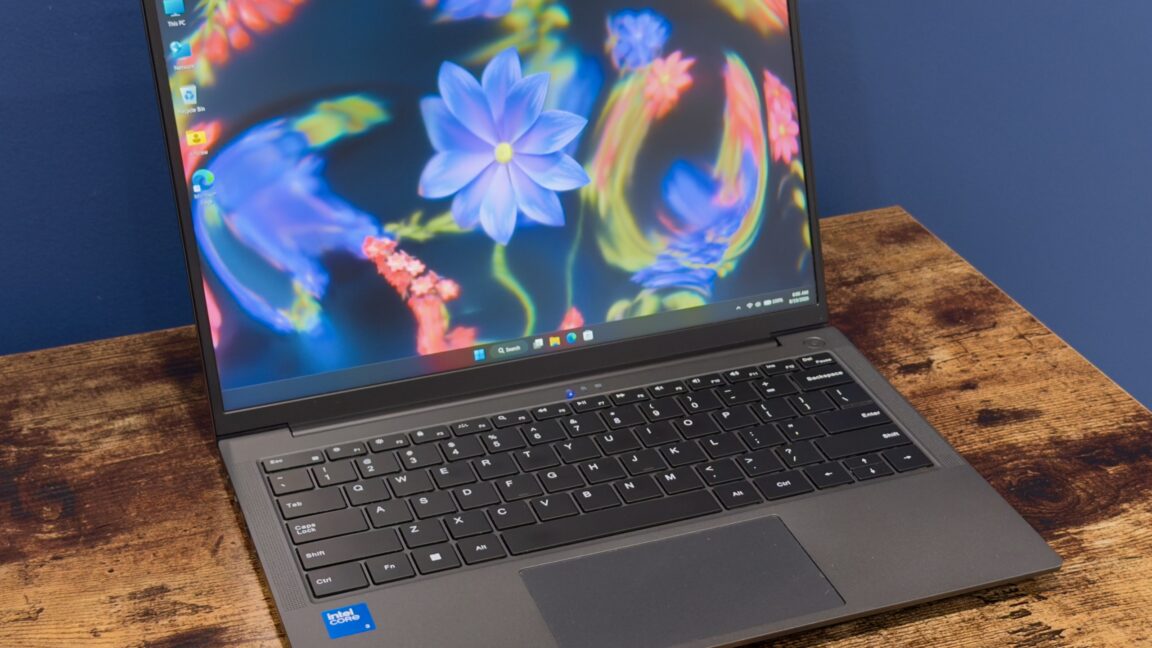
Also in the “good” column is the laptop’s perfectly not-bad keyboard. The keys aren’t as firm or satisfying as those on the keyboards in the MacBook lineup or in Framework’s Laptop 12 or Laptop 13, but the typing feel is decent, and the backlight is nice and even. The computer is missing a fingerprint reader (there’s also no face-scanning camera, which means the Unibook has no biometric login option at all), but this is a corner that the MacBook Neo’s base model also cuts.
Judged by the standards of the category, the Unibook’s screen isn’t awful. It’s a 13-inch IPS display panel with a decent 1920 x 1200 resolution and 16:10 aspect ratio, a step up from the 16:9 1080p displays you’ll still find in some ultra-budget systems. But it’s also not very nice by the MacBook Neo’s standards: only 300-ish nits of maximum brightness, pretty noticeable backlight bleeding around the edges (at least on our unit), and around 59 percent coverage of the sRGB color gamut, according to my colorimeter. At that level, colors appear visibly faded or washed-out to the naked eye; I find it particularly noticeable with shades of red and purple.
The trackpad is probably the worst of the Unibook’s core features. The actual finger tracking is OK, one gift of the precision trackpad era that endures despite the hardware’s shortcomings. Aside from that, it’s awful—it’s stiff. It’s hard to click. It’s so, so loud. It’s a trackpad that makes you glad for tap-to-click. It’s almost bad enough to ruin the laptop all by itself, though it does have some other help.
What the Unibook does ship with is all kinds of weird little Microsoft bits and bobs that don’t come with a clean-from-USB Windows 11 install, including a “mobile plans” app (the laptop has no modem, and the app opens to a blank window that does nothing), and the obscure “Microsoft PC Manager” app. The only page I can find for it on what is apparently Microsoft’s actual website is full of bizarre, possibly auto-translated sentence fragments like “Cleanup your system and free up spaces” and “Enhance the efficiency of computer use”). Some Chinese language packs are also preinstalled.
Normally, I’d treat this sort of PC the same as I’d treat most computers from most OEMs: Blow away the stock Windows installation and control my own destiny. Sure, a “clean” install of Windows 11 isn’t the cruft-removal magic wand that it used to be, but it’s still a good way to make sure you’re dealing mainly with Microsoft’s nonsense and not additional manufacturer-added nonsense on top of that.
For the Unibook, this wasn’t smooth sailing.
As you saw earlier in this review, Chuwi’s support site is currently suffering from an acute case of “Database Working Un-normal.” This made downloading drivers pretty difficult, partly because Wildcat Lake is new enough that Windows Update doesn’t seem to have drivers ready to go.
As a precaution, I replaced the Unibook’s drive with a spare 256GB SSD I had pulled from some other laptop at some point. When I ran into problems getting some of the hardware to work, I switched back to the old SSD and used Windows’ built-in DISM servicing tool to export every single third-party driver installed on the system.
If you need to reinstall drivers onto the Unibook without the benefit of a backup from the existing system, this patchwork also seemed to clear all the exclamation points from the Device Manager:
But even with a nice, clean Device Manager, sound still wasn’t coming out of the Unibook’s speakers—it didn’t even see that an audio output was installed. By diving into the “System devices” section and selecting a generic audio controller driver, I was able to install an “Intel Smart Sound Technology Bus” device that finally seemed to make Windows recognize the remainder of the not-installed audio drivers, which got everything working again.
For your convenience, I am also including the pile of audio drivers I extracted from the Unibook’s default Windows install here.
The audio problem was also present in Linux, when I tried Kubuntu 26.04 LTS on the system. In addition, the laptop wouldn’t go to sleep when its lid was closed, which put a pretty good dent in the battery life. Some others have had some success getting this stuff working, but it wasn’t something I spent much time on for this review.
Wildcat Lake only has one or two P-cores (one for this version of the Unibook), four E-cores, and one or two GPU execution units. But they at least benefit from being built on the same architectures as the Panther Lake Core Ultra Series 3 processors, including the Intel 18A process for the main CPU die.
Objectively, performance is not impressive. But even a single P-core means a much faster and snappier-feeling computer than you’d get if you used one of Intel’s all-E-cores budget processors, and the Core 3 304 chip is perfectly serviceable for browsing, communicating, or streaming video. The comparison to Apple’s A18 Pro, the MacBook Neo’s chip, isn’t especially flattering for Intel—the Core 3 304 has one fewer P-core and higher power consumption, which means its performance-per-Watt for heavy tasks is pretty bad (it doesn’t use a ton of power, but it takes a very long time, so overall efficiency for these tasks isn’t great.) The Core 3 304’s single-core GPU also looks pretty bad next to the A18 Pro’s.
If you were hoping to play games or edit photos or video, the other blocker is the 8GB allotment of RAM, which was little enough that it kept benchmarks like Cinebench 2024, Cinebench 2026, or many GPU benchmarks from running entirely.
And that’s before you get to the actual specs. The Unibook is a decent showcase for Intel’s Core Series 3 processors, which offer pretty stellar battery life, along with performance that’s more than good enough for basic computing. But 8GB of RAM will severely limit the kinds of apps that run well (or run at all) on a PC, and trying to play anything other than basic 2D games on a laptop like this won’t go well.