
Development
Framework Laptop 13 Pro review: Much better battery, much worse price
July 27, 2026 Development Source: Ars Technica
Share this article



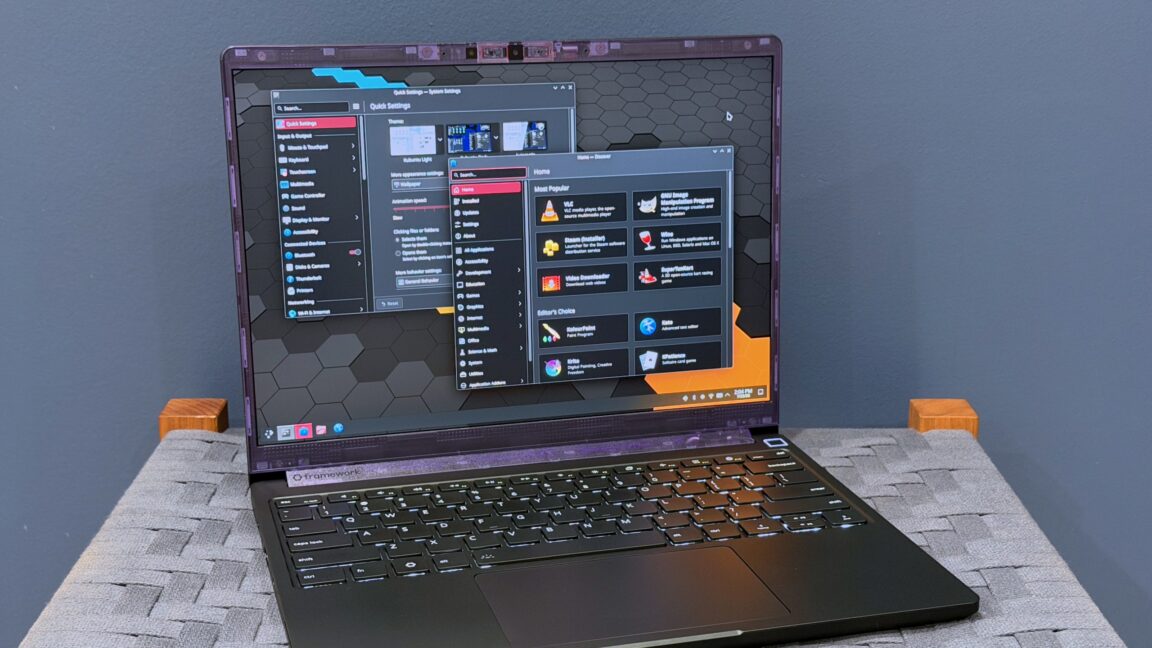
Framework says that the Laptop 13 Pro is its first to be “fully machined out of extruded blocks of 6063 aluminum,” and as a result, the device’s body feels slightly more solid and substantial than the original version.
The redesigned bottom case allowed Framework to fit in a bigger battery than older Laptop 13 models—74 WHr, up from 61 WHr in previous models and 55 WHr in the first couple generations. The release mechanism for the expansion modules has also been changed. The original Laptop 13 had buttons that had to be continually pressed as you pried the expansion modules out; the Laptop 13 Pro uses the same kind of on/off retention switches Framework uses in the Laptop 16 and Laptop 12.
Those are all marginal but noticeable improvements over the previous-generation display, and if you’re still using a glossy or matte 2,256×1,504 screen from early Framework Laptop 13 iterations, this new screen will be an especially noticeable upgrade. But it’s still not an OLED display, and it’s still missing complete coverage of the DCI-P3 color gamut, to name a couple of more advanced features that remain absent. And the display quality still isn’t perfect; I noticed minor light bleed across the top of my review unit’s display when it was showing something dark.
(One less-noticeable screen change: the top corners of the new screen are actual 90-degree angles again, rather than little curves. The curves on the older display were a side effect of a display panel Framework used that was originally designed for another company. The corners never really bothered me that much, and I hesitate to call this an “upgrade” in and of itself. But the rounded corners didn’t line up with Framework’s bezels, and Windows and Linux have never respected the tiny little dead zones that they create, so, sure, fine.)
In the end, this is still the Framework Laptop 13. But it’s probably as close to a design overhaul as you can get while still maintaining compatibility with a critical mass of important parts (the board, screen, and expansion port modules chief among them).
Framework is positioning the Laptop 13 Pro as a “MacBook Pro for Linux users,” and Ubuntu 24.04 LTS is available for the first time as a preinstalled OS for the laptop’s prebuilt edition.
The Laptop 13 Pro still supports Windows 11 just fine, of course, and for the sake of consistency, all of my performance and battery benchmarks were done in Windows 11 25H2.
But aside from the ability to have Linux preinstalled, there’s actually nothing special about the Laptop 13 Pro’s Linux support. That’s because Framework has officially supported Ubuntu and Fedora on all of its laptops, including previous Laptop 13 models. After a couple of bumpy years during which Linux users who wanted BIOS updates would need to figure out how to temporarily install Windows first, Framework’s BIOS updates are available for easy download and installation through LVFS (the Ryzen 7040 version of the Framework Laptop that I run Kubuntu 26.04 on, for example, grabbed its Laptop 13 Pro-supporting BIOS update through the same updater as all other apps and system components).
Apart from Ubuntu 24.04, Framework says that Ubuntu 26.04 LTS and Fedora 44 are officially supported and should work out of the box, while CachyOS, Bazzite, Arch, and NixOS 26.05 are all “compatible community supported distributions” that will generally work fine with a little extra tweaking. Any distribution you run should include at least Linux kernel version 6.19 to ensure working support for Intel’s Core Ultra Series 3 chips and the rest of Framework’s hardware; kernel 7.0 or higher is recommended.
But moving to LPCAMM2 was also something of a necessity for Framework. The company doesn’t seem to want to ship a laptop with non-upgradeable memory, as it had to use in the Framework Desktop (Framework didn’t ship a Core Ultra Series 2 laptop at all, possibly because the most suitable processors from that chip family used RAM that was integrated into the CPU package). But it also had to use LPDDR5X to ship the higher-end Core Ultra Series 3 processors and their fully enabled Intel Arc integrated GPUs. Unlike the past Intel and AMD generations Framework has used, regular DDR5 isn’t even supported. That makes LPCAMM2 the only real option, bleeding edge though it is.
Framework isn’t the first laptop manufacturer to use LPCAMM2. Both Dell and Lenovo have experimented with the modules in a couple of laptops so far. But it’s rare, and in the short term, that rarity makes it harder to buy, both for end users and for Framework itself. Framework has been increasing prices for various components all year as shortages of RAM and other components have dragged on, but its supplier recently doubled the prices Framework was paying for LPCAMM2 modules, an increase Framework will be passing on to most people who haven’t already put in their Laptop 13 Pro preorders.
So going with LPCAMM2 is double-edged: it is both technically beneficial and technically necessary, but it’s also singlehandedly driving up the price of an already pretty expensive boutique-y laptop. It’s not Framework’s fault, but it is Framework’s reality, and it’s too bad that such a high price will make this laptop’s improvements mostly theoretical, even to people who could pay the prices Framework was charging a couple of years ago.
Some Laptop 13 Pro parts break compatibility with the older Framework Laptop 13, but Framework did manage to preserve compatibility between many major components. That means older Laptop 13 models can benefit from newer Laptop 13 Pro parts—the same as any of the other upgraded boards Framework has released for the Laptop 13 over the years—and that the new Laptop Pro chassis can be built around older, cheaper Framework motherboards.
If you’re looking for an easy rule of thumb, treat the new 74 WHr battery, input cover with the haptic trackpad, and bottom case as a single upgrade. If you want the benefits of any of these components, you need to buy all of them. You can’t just put the new battery into an existing Framework Laptop 13, and you can’t use the new input cover with the old battery and bottom cover.
But motherboards, displays, and USB-C expansion cards are all interchangeable between the Laptop 13 and the Laptop 13 Pro. If you just want to buy a new Core Ultra Series 3 motherboard and put it in your existing Laptop 13, you can (along with a new CAMM memory module, of course). If you want to keep all of your current parts but upgrade to the new-and-improved touchscreen display panel, you can.
Here’s a non-comprehensive table listing the current prices for some of the upgrades for current Laptop 13 owners who want to benefit from some of the Laptop 13 Pro’s improvements without springing for a full-priced upgrade. Bear in mind that many of these parts are listed on Framework’s site but are either out of stock or have not yet been made available to purchase. Buyers can “register interest” in an all-in-one upgrade kit that includes a new battery, keyboard, and bottom case for an original Laptop 13, but it’s not available to buy yet, either.